Showing posts with label SEO Guides. Show all posts

Thursday, 13 February 2014

Sticky "Horizontal Social Sharing" Widget For Blogger


Social Networking websites has become the middle of the activities of the web because it able to attract every and each user who using internet either from colleges, offices or homes. now a days individuals like to Share gorgeous article with the Social community that edges everybody altogether. It’s important for each blogger and webmaster to integrate Social Sharing or Like button in their journal, therefore their guests will share their stories on finest social networking web site, this can not solely offer them coverage however it'll additionally build loyal audience. There are unlimited Social Share widgets that are obtainable on numerous blogs, however they either lacks in counting button or they're not designed well. If you've got seen those WordPress journal that have a Horizontal Social Sharing Bar that floats once a page is scrolled, therefore nowadays we are going to share the similar variety of widget for Blogger that consists of Facebook, Twitter, Google plus, Pinterest, Digg and Stumbleupon Sharing buttons.

Install The Widget To Blogger

  • Go To Blogger.com >> Your Blog >> Template
  • Now Backup your template.
  • Then select Edit HTML
  • Search for and just above it paste the follow HTML + JavaScript + CSS code.
<script src='http://ajax.googleapis.com/ajax/libs/jquery/1.7.2/jquery.js' type='text/javascript'/> <b:if cond='data:blog.pageType == &quot;item&quot;'> <style type='text/css'> /*<![CDATA[*/ #mblSocialFloat {clear:both;padding: 6px 0;display:block;background:#FFFFFF;} #mblSocialFloat td{padding:4px;margin:0;border:none;} #mblSocialFloat td iframe{max-width:82px;width:82px !important;} #mblSocialFloat.mblFloatSocial{position: fixed;top:0;z-index:9999999;border-bottom:1px solid #ccc;-webkit-box-shadow:0 1px 1px rgba(0,0,0,0.15);-moz-box-shadow:0 1px 1px rgba(0,0,0,0.15);box-shadow:0 1px 1px rgba(0,0,0,0.15);} /*]]>*/ </style> <script type='text/javascript'> /*<![CDATA[*/ // Set the Top Offset $theOffset = 0; jQuery(document).ready(function(b){var a=b("#mblSocialFloat");a.wrap('<div id="mblSocialPlaceholder"></div>').closest("#mblSocialPlaceholder").height(a.outerHeight());a.width(a.outerWidth());e=a.offset().top-$theOffset;b("#mblSocialFloat iframe[src*=plusone]").closest("div").css("max-width","82px");b(window).scroll(function(){d=b(this).scrollTop();d>=e?a.addClass("mblFloatSocial"):a.removeClass("mblFloatSocial");f=b(".post");if(f.length!=0){c=f.outerHeight()+f.offset().top;d>=c?a.stop().animate({top:"-150px"}):a.stop().animate({top:$theOffset+"px"})}else d>=e?a.css("top",$theOffset+"px"):a.css("top","0")})}); /*]]>*/ </script> <script src='http://mbl-flipper-google-blogger.googlecode.com/files/mbl_blogger_pinit.js' type='text/javascript'/> <script type='text/javascript'> /*<![CDATA[*/ // Twitter (function(a,b,c){var d=a.getElementsByTagName(b)[0];if(!a.getElementById(c)){a=a.createElement(b);a.id=c;a.src="//platform.twitter.com/widgets.js";d.parentNode.insertBefore(a,d)}})(document,"script","twitter-wjs"); // Google + (plus) (function(){var a=document.createElement("script");a.type="text/javascript";a.async=true;a.src="https://apis.google.com/js/plusone.js";var b=document.getElementsByTagName("script")[0];b.parentNode.insertBefore(a,b)})(); // Stumbleupon (function(){var a=document.createElement("script");a.type="text/javascript";a.async=true;a.src="https://platform.stumbleupon.com/1/widgets.js";var b=document.getElementsByTagName("script")[0];b.parentNode.insertBefore(a,b)})(); // Digg (function(){var a=document.createElement("SCRIPT"),b=document.getElementsByTagName("SCRIPT")[0];a.type="text/javascript";a.async=true;a.src="http://widgets.digg.com/buttons.js";b.parentNode.insertBefore(a,b)})(); /*]]>*/ </script> </b:if>

Adding the Horizontal Social Sharing Button in Blogger Template:

Now let’s add the final Piece of code, Search for <data:post.body/> and just before/above it paste the following coding.


<!-- guidetivist.blogspot.com Floating Social Bar -->

<b:if cond='data:blog.pageType == &quot;item&quot;'>
<div class='mblSocialFloat' id='mblSocialFloat'>
<table class='mblSocialFloat' width='100%'>
<tr>
<td>
<a class='twitter-share-button' expr:data-text='data:post.title' expr:data-url='data:post.url' href='https://twitter.com/share'>Tweet</a>
</td>
<td>
<iframe allowTransparency='true' expr:src='&quot;//www.facebook.com/plugins/like.php?href=&quot; + data:post.url + &quot;&amp;send=false&amp;layout=button_count&amp;width=80&amp;show_faces=false&amp;action=like&amp;colorscheme=light&amp;font&amp;height=21&quot;' frameborder='0' scrolling='no' style='border:none; overflow:hidden; width:80px; height:21px;'/>
</td>
<td>
<div class='w2bPinitButton' expr:id='&quot;w2bPinit-&quot; + data:post.id' style='display: none;visibility: hidden;height: 0;width:0;overflow: hidden;'> 
<data:post.body/>
<script type='text/javascript'>
w2bPinItButton({ 
url:&quot;<data:post.url/>&quot;, 
thumb: &quot;<data:post.thumbnailUrl/>&quot;, 
id: &quot;<data:post.id/>&quot;, 
defaultThumb: &quot;https://blogger.googleusercontent.com/img/b/R29vZ2xl/AVvXsEhkkK7VtnpxQqPRi5p9jiSqtncOg37sbd8QtcaoHyLSAGl9AqS8tDaOaZpnsRppiY43guq9z9zIU5_1LwbVpqiPnprKgFNs22ZGAEWpO248RAtjiS2bi8tQxp6o8zws82Vecyq1DrF8HKMm/s1600/w2b-no-thumbnail.jpg&quot;, 
pincount: &quot;horizontal&quot; 
}); 
</script> 
</div>
</td>
<td>
<div class='g-plusone' data-size='medium' expr:data-href='data:post.url'/>
</td>
<td>
<su:badge expr:location='data:post.url' layout='1'/>
</td>
<td>
<a class='DiggThisButton DiggCompact'/>
</td>
</tr>
</table>
</div>
</b:if>
<!-- Guidetivist.blogspot.com Floating Social Bar -->
 All Done now See You Floating Sharing Bar on Your Posts if You have any problems comment below.

The 110 Highest Paying Keywords For infolinks Publishers


Today im Going To show you how to check the keywords that are highly paid by infolinks network you have to write them in a text file and store it in your mind first of fall this list is the highest paying infolinks keywords

KEYWORDS


1. Purchase Structured Settlements – 53.482.
2. Mesothelioma Lawyers San Diego – 51.473.
3. Secured Loan Calculator – 51.354.
4. Structured Settlement Investments – 50.455.
5. Endowment Selling – 50.356.
6. Mesothelioma Patients – 50.237.
7. Mesothelioma attorney San Diego – 50.078.
8. Austin Texas dwi lawyers – 50.039.
9. New York Mesothelioma Lawyers – 50.0110.
10. Phoenix dui lawyers – 50.01
11. Secured Loans – 50.0112.
12. Insurance Auto – 50.0013.
13. Phoenix dui attorney – 50.0014.
14. car free insurance online quote – 50.0015.
15. students debt consolidation loans – 49.9616.
16. Pennsylvania mesothelioma lawyers – 49.8717.
17. data recovery Denver – 49.7118.
18. adverse credit remortgages – 49.5619.
19. bad credit remortgages – 49.4720.
20. data recovery service los angeles – 49.37
21. Consolidating Students Loan – 49.3022.
22. Students Loan Consolidation Rates – 49.1723.
23. Boston dui lawyers – 49.0224.
24. memphis car insurance – 48.8625.
25. conference calling companies – 48.6426.
26. dui attornes los angeles – 48.6027.
27. georgia car accident lawyers – 48.3628.
28. san diego dui defense – 48.3229.
29. Phoenix arizona dui lawyers – 48.2830.
30. Los angeles dwi attorneys – 48.20
31. Student Consolidation Loans – 48.1532.
32. free quote for car insurance – 48.1133.
33. irs tax lawyers – 48.0834.
34. nj auto insurance – 48.0835.
35. dui san diego – 48.0136.
36. Los Angeles Criminal Defense Attorney – 48.0037.
37. Consolidating Private Student Loans – 47.9638.
38. Personal Injury Lawyer Chicago – 47.8339.
39. Personal Injury Attorney Pennsylvania – 47.8240.
40. Auto Insurance – 47.81
41. Lemon Law California – 47.6342.
42. Students loan consolidation interest rates – 47.5943.
43. Los Angeles Criminal Attorney – 47.5944.
44. Arizona dui Attorney – 47.4545.
45. Consolidation Student Loan – 47.4446.
46. Structured Settlement Buyers – 47.3147.
47. Culinary Schools California – 47.1048.
48. Student Consolidation Loan – 47.0649.
49. Instant Car Insurance Quote – 47.0050.
50. Iva debt help – 46.90
51. UK home owner loan – 46.6752.
52. endowment policy sales – 46.5853.
53. sell structured Insurance settlements – 46.5354.
54. College Loan Consolidation – 46.4955.
55. dui attorney Sacramento – 46.4856.
56. car insurance quotes – 46.4757.
57. Philadelphia personal injury lawyers – 46.3758.
58. Remortgaging – 46.2059.
59. irs tax attorney – 46.1960.
60. Consolidation Student Loan – 46.18
61. buyer Structured Settlement – 46.1762.
62. California mesothelioma attorney – 46.1463.
63. home mortgages for bad credit – 46.0264.
64. selling structured settlements – 45.9665.
65. phoenix dui lawyers – 45.9066.
66. sell structured settlement payments – 45.7267.
67. Donate your car – 45.5668.
68. Student loan consolidation – 45.4669.
69. Consolidate School Loans – 45.4570.
70. Injury Lawyers 4 You – 45.44
71. homeowner consolidation loans – 45.4272.
72. Colorado Truck Accident Lawyers – 45.4173.
73. Mesothelioma doctor – 45.0974.
74. School Loan Consolidation – 45.0975.
75. dui attorney San Francisco – 44.9576.
76. ny car insurance – 44.8377.
77. Mortgage refinance new jersey – 44.7778.
78. Structured settlement payments – 44.4379.
79. Car Insurance Texas – 44.4180.
80. Virginia Car accidents Lawyers – 44.35
81. Raid Data Recovery Services – 44.3382.
82. College loan consolidation – 44.2883.
83. compare car insurance rates – 44.1484.
84. Break down covers – 44.1485.
85. Remortgages Loan – 44.0586.
86. Austin Criminal Attorney – 44.1487.
87. Car Insurance Quotes online – 44.1488.
88. Structured Settlement Consumer Info – 44.1489.
89. Arizona dui lawyers – 44.0590.
90. e loan mortgage – 43.98
91. Consolidation of Student Loan – 43.9592.
92. Student Loan Consolidation Calculator – 43.9493.
93. Injury Lawyers 4 You – 43.9494.
94. Managed Hosting Services – 43.9395.
95. Bad Credit Home Equity – 43.9096.
96. Los Angeles Criminal Attorneys – 43.8897.
97. Home improvement loan rates – 43.8898.
98. auto insurance in Michigan – 43.7999.
99. dwi fort worth – 43.78100
100. Structured Settlement Companies – 43.77
101. Educational Loans
102. Online Degree
103. Student Loans
104. Personal Loans
105. Reward Cards
106. Free Forex Trading
107. Loan Calculator
108. Mortgage Loans
109. Web hosting
110. Merchant Account


HOW TO FIND HIGHEST PAYING KEYWORDS ?

The above list is the keywords that are highly paid but these are changed by time to time so you have to check it by your own for this purpose go to your any post and scroll down above the comment you can see a 2 lines of link that are highly paid keywords for your blog.

FINAL WORDS

Now You Have The Ability To Increase You Earnings PLease Feel Free To Comment Below And Appreciate My Hard Work :)

Wednesday, 12 February 2014

How To Get Fast Web & Social Traffic on a New Blog?


Now a days the best blogging service which is getting popular day by day is blogger by Google Inc there are millions of people who created blog and getting profit from it but also there are some which dont even know how to make your blog popular so today im providing my time for those of you who dont know about it so without wasting your time lets start.


YOUR BLOG DESIGN:

To make your blog popular you first have to make a professional template for your blog because the first thing a user see and attracts from is your blog template if your blog has not a good design so first of fall go a head and grab it from our site template zone or get it from sites like btemplates,themeforest or other sites i recommend you buy a template from themeforest beacuse it has premium templates that are seo friendly and have a good design.

USE JINGLING FOR 1 MONTH

Another thing that i will recommend you to use is jingling it is a chinese free web flow software in basic words it is a traffic generating bot which will increase you page views and alexa rank i know that it is illegal but using it for 1 month its a big deal or if you dont want to use it then promote your website by your own but remember use jingling for only one moth excess use of it may ban you blog.

USE SOCIAL WIDGETS

There are many website  or blogs that are providing free blogger social widgets our blog also have some quality social widgets which you can use for increasing traffic Also use facebook like popup box that will increase you presence on social sites like facebook,twitter,google+

FINAL WORDS

Thats all for today in my next article i will show you how to use jingling and seo basics for now use these tips to increase you web presence.

Like To Download 'Social Content Locker' For Blogger Downloads

Some People Create There New Blog Page on Facebook but not get as many likes but today im going to show you a way from which you can get many likes if you have a blog that provides free download than it is the time that you lock that free download and rather asking a user first to like your page and then give the downloading link of the file to your website visitors it is a facebook like gate in which a user first like your page and then download a file it will definitely increase your facebook page likes in bulk for free.


PREVIEW


Powered by Mash Arena


FEATURES

  • Beautiful Design
  • Increase Your page likes
  • Easy To Customize
  • Free Blogger Widget
  • SEO Optimized Widget
  • BUILD WITH PHP,MySQL
  • Fast

INSTALLATION

Follow The Following Steps To Add 'Like To Download' To Your Blogger Posts
  • Go to Blogger.com
  • Click on New Post
  • Click on HTML Section Beside Compose
  • Scroll Down & paste the Following Code:
<!-- Start of MashArena Like to Download Embed Code --><br /><div style="width: 520px;"><iframe allowtransparency="true" frameborder="0" scrolling="no" src="http://convertsocial.com/embeds/like-download/like-download.php?fburl=http://www.Facebook.com/MashArenaBlog&amp;rurl=https%3A%2F%2Fwww.mashmusik.blogspot.com%2F&amp;width=500&amp;height=157.5&amp;header=1&amp;color=2" style="border: none; height: 163.5px; overflow: hidden; width: 520px;"></iframe><br /><div style="font-size: 10px; margin-top: 0px; text-align: center;">Powered by <a href="http://www.masharena.blogspot.com/" target="_blank" title="Mash Arena">Mash Arena</a></div></div><!-- End of Mash Arena Like to Download Embed Code -->

 CUSTOMIZATIONS

  • Replace MashArenaBlog With You Facebook Page Username
  • Replace www.mashmusik.blogspot.com With You Downloading link

FINAL WORDS

Now Enjoy You Facebook Page Likes and Like To Download Widget But in Return Please Subscribe and Like Below..!!

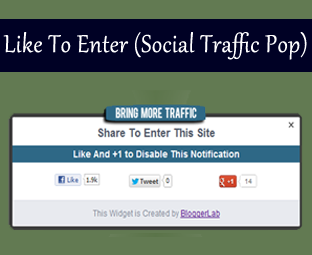
Add Like To Enter 'Social Popup Box' in Blogger


Social Networking Sites Are Great For spreading you blog and getting traffic from it today i will show you how you can increase you social presence with today tutorial.

LIKE TO ENTER SOCIAL WIDGET:

Today I Will Give You a Special Widget Which definitely increase your social presence on Facebook,Twitter and Google+ This Widget Comes With These Three Sites Like,Follow & +1 Button You Can Show it on your homepage when a visitor enters your site he see the box there is a close button when visitor click it the box will close but if you font want to show the close button its not a big problem i will show it later how to do it so lets get towards the tutorial.

PREVIEW


INSTALLATION

  • Head Over To Blogger.com
  • Sign in
  • Click on Template
  • Edit HTML
  • Search For ]]></b:skin>
  • Then Above it Paste The Following CSS Code:


    /*---MashArena.Blogspot.Com Like To Enter Advance Traffic POP ---*/ .blackout { display: none; position:fixed; _position:absolute; width: 100%; z-index:10000; background-color:#000; margin: 0px; padding: 0px; left:0; top:0; } .socialmodalOuter { display: none; font-family: arial; color: #575E6D; font-size: 14px; line-height: 20px; background: rgb(73, 73, 73); /* The Fallback */ background: rgba(0, 0, 0, 0.6); border-radius: 10px; left: 50%; padding: 7px; position: fixed; _position:absolute; top: 50%; z-index: 10001; } .socialmodal { background: none repeat scroll 0 0 #FFFFFF; border-radius: 3px 3px 3px 3px; width: 460px; } .socialmodal .title { border-bottom: 1px solid #E5E8EF; font-weight: bold; font-size: 19px; font-weight: bold; padding:16px 15px 10px 15px; text-align:center; } .socialmodal .subtitle { margin: 0px; background:#2e6886; color:#ffffff; padding:4px; text-align:center; font-weight: bold; font-size: 15px; } .socialmodal .warning { margin: 0px; background:#cb2026; color:#ffffff; padding:4px; text-align:center; } .socialmodal .content { padding: 0px 15px; margin-top: 10px; line-height: 17px; } .socialmodal .share { padding: 0px 15px; margin:20px 0px 15px 0px; text-align:center; height: 24px; } .socialmodal .close { background: url("https://blogger.googleusercontent.com/img/b/R29vZ2xl/AVvXsEgf_KrKg2dbvotLvxr4E8qQQrv8-CYpudyiT97Dd28oSc7TPLspCScL8GGfl6TL1hfr48KbIwWjUmCkajH_6Cn8kQdPFGSGQ6_2BCnR6mzHcuQPsgsHNX_3OhKKYkVG5tD4FNl-_oygPlM/s1600/close.png") no-repeat; cursor: pointer; height: 12px; position: absolute; right: 15px; top: 15px; width: 12px; display: none; } .socialmodal .button { float: left; width: 115px; line-height: 24px; height: 24px; } .socialmodal .like { margin-left: 15px; } .socialmodal .twttr { margin-left: 30px; } .socialmodal .plus { width: 90px; margin-left: 50px; } /* // cusomize position of elements */ .socialmodal .footer { clear: both; background: none repeat scroll 0 0 #E8EAEF; border-radius: 0 0 3px 3px; border-top: 1px solid #DDE0E8; padding: 10px 0; color: #878D9C; text-shadow: 0 1px 0 #FFFFFF; text-align:center; font-size:13px; }

    /*---MashArena.Blogspot.Com Like To Enter Advance Traffic POP ---*/ Now After Adding The CSS Code Head Over To The HTML/JavaScript

    • Go to Layout
    • Click Add a Gadget
    • Now Scroll Down & Select HTML/JavaScript
    • And Paste The Following Code in It
    <script src="http://code.jquery.com/jquery-latest.min.js"></script> <script> !window.jQuery && document.write('<script src="js/jquery.js"><\/script>') </script> <script src="http://apis.google.com/js/plusone.js" type="text/javascript" gapi_processed="true"></script> <script src="http://connect.facebook.net/en_US/all.js#xfbml=1" type="text/javascript"></script> <script src="http://platform.twitter.com/widgets.js"></script> <script src="http://mybloggerlab.com/Scripts/Sharetoenter.js" type="text/javascript"></script> <script src="http://mybloggerlab.com/Scripts/jquery.cookie.js" type="text/javascript"></script> <script language="javascript"> $(function() { $('body').socialmodal({ uniqueName: 'autoloadmodal', subtitle: 'Like And +1 to Disable This Notification', facebook: 'http://www.facebook.com/mybloggerlab', plusone: 'http://www.mybloggerlab.com/', count: 0, manualClose: true, }); $('body').socialmodal({ twitter: 'mybloggerlab', onclick: '#download', callback: function(success) { }, }); }); </script>

    CUSTOMIZATIONS

    Now Replace The Yellow Highlighted Links & Words With Your Own Social Sites link and Sentence if You Want To Remove The Close Button Change  manualClose: true,To manualClose: false,

    WHAT I WANT FROM YOU ?

    Hey I Post This Article Specially For You Now Its Your Turn To Give Me Some Credits Please Subscribe & Like Below & Comment Below It takes Only 5 Seconds :)

    Check That 'Is Your Website Responsive or Not' ?

    Responsive Website Checker


    Many People make website and design it but forget to keep it optimized for new devices they make it and forget it they don't check that it is responsive or not so today we are here to tell a tool created by bloggeritems.com Called Smart Responsive Tester on which you enter your website and select screens on which you want to Check your website so without wasting your time Click on the following Button and check that is your website is responsive.


    Saturday, 8 February 2014

    Check Your Website Bounce Rate in Google Analytics

    Google Analytics Bounce Rate


    SEO is the most important aspect in blogging era because without SEO your blog is nothing and it will not generate any traffic so the first thing you should focus on is SEO You Should Make Your Blog like one which everyone like.

    Blogger Bounce Rate

    TODAY'S TOPIC

    How To Check Your Blog Bounce Rate So you are thinking that what is the ' BOUNCE RATE ' Really is so it is:

    " Percentage of visitors who enter the site and "bounce" (leave the site) rather than continue viewing other pages within the same site "
    Bounce Rate is very important aspect in your SEO Strategy because if a website has a bounce rate of 50% it will not ranked in search engines because Google thinks that it is not useful or the website is spam so it is good for your blog that you have less bounce rate because if you have less bounce rate more the chances to be ranked in search results.

    How Bounce Rate is Calculated ?


    Bounce Rate is Calculated By Above Formula in Which:


    Rb = Bounce rate
    Tv = Total number of visitors viewing one page only
    Te = Total entries to page

    So Today We Are Going to tell you that how to check the bounce rate of a website so after checking that you will notice that how good is your website or blog in Bounce Rate.You Can Reduce Bounce Rate by Reading Our Upcoming Article.

    So Lets Get Started By What You need To Check Your Website Bounce Rate

    Things You Need

    1. Google Account
    2. Google Analytics Account

    Lets Get Started

    • First You have To Go To http://www.google.com/analytics/ Then Click on 'Access Google Analytics' from top right corner.
    • Now if You have Already Setup a Google Analytics You Have All your accounts shown in front of you but if don't already have set up a Google Analytics for your website or blog first set it up.
    • Now Expand Your Account And You Will See The Bounce Rate Of Your Blog.

    In My Case i Have 10.39% Which is Pretty Good For Me Now Because i Started This Blog a Month Ago So See You Blog Bounce Rate & Optimize You Blog For Less Bounce Rate.

    Friday, 7 February 2014

    Disable Tracking of Your own Pageviews in Blogger

    Disable Blogger To Track Your Own Visits

    Blogger Has an Awesome Multi-featured Dashboard and it shows all the things that you needed to search engine optimize your blog it has number of pageviews,comment,followers shown on blog dashboard and in stats tab but you often think that the pageviews number showing on dashboard is my own visits to my own blog is calculated? Yes it is Your Each Visit to any of your post or on your blog gives an increasing in pageviews but you are thinking that it is good you can visit you blog back and back to increase pageviews in blogger but ceratinly it is a negative point for your SEO metrics so what now ?

    Today's Topic

    Don't Track Your own Pageviews in Blogger Blog

    Why it is Important To Don't Track Your Own Pageviews ?

    It is important to disable this feature because it will show your pageviews in the pageviews number and you think that there is so many visits to my blog by disabling it you will able to see the actual visits to your blog and make some good SEO strategies to increase you pageviews So Let See How YOu Can Do It.

    Tutorial:

    • First Go to Blogger.com
    • After That Click Your Blog on Which You Want To Apply The Trick
    • Now Select 'Stats' Tab From The left Sidebar of Dashboard
    • Now You Will See a Box on Right side in which Pageviews history is given below it click on Don't Track Your own Pageviews As Shown in Picture
    Pageviews in Blogger

    • Now After Clicking a Dialog box Will Open Now Select Don't Track Your own Pageviews as Shown in Picture.
    Disable Page Views in Blogger

    • Now You Are Done  !

    From Guidetivist

    Now You Have Successfully Go Through The Tutorial If You Have Implemented it Please Share The Tutorial So Others Can Also Do The Same :)

    Submit Your URL To Bing & Yahoo For Fast Indexing & Traffic


    After Google the biggest and major search engines are Yahoo & Bing so get your business online you must have to get visitors from these two search engines also i see that most of the peoples spend time in doing SEO according to Google Policies but they don't take Bing and yahoo serious Bing is the second most popular search engine with 20% search query after its competitor Google which has a search query of 70% the other search engines so today i will give you an awesome tip to submit your URL to Bing and yahoo.

    It is More Usefull When You have a blog and you update it on daily basis so when you post a new article you copy its URL and Simply Paste it in The Submit Box of Bing So it will submit you Article To Bing and will also ping it So by this your article views will increase dramtically and by this there is also more chances of the increase in your readership.

    One More thing that i want to tell that Bing and Yahoo are Also Partnering up so when you submit the URL to Bing it will also submit it to yahoo so you don't care to

    You Will Also Like:
    Submit Your Blogger Sitemap To Google & Bing For Fast Indexing

    To Submit URL To Bing Follow The Steps: